
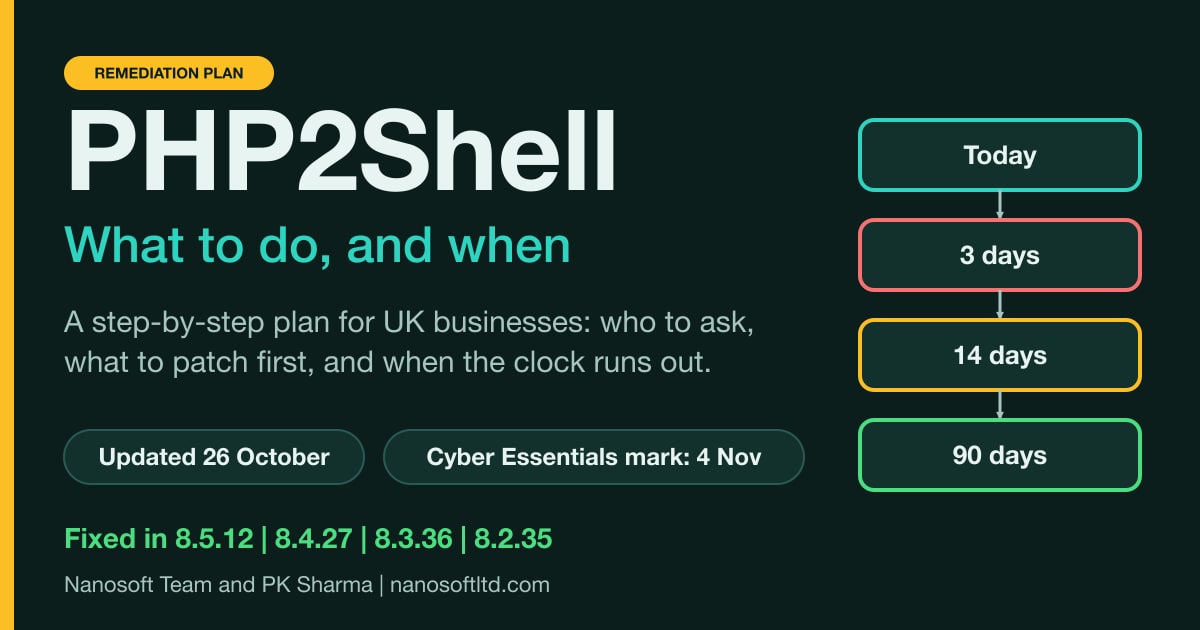
Four days after PHP shipped emergency fixes for PHP2Shell, the picture has changed. Attackers have gone from probing to running commands on honeypot servers. No compromise of a real organisation has been publicly confirmed. Vendors are shipping fixes at different speeds, a third and lower-risk PHP advisory has appeared, and one compliance date falls on 4 November.
This is a plan, not a news summary. It sets out where things stand on 26 October, how to find every PHP system you have, what to patch first and what to ask your hosting company or web agency, with a message you can send today. It also covers the data protection steps if you think data was exposed, and what the Cyber Essentials 14-day rule means for your dates.
Our first report on PHP2Shell has the technical detail on how the two flaws work and how to detect attacks. This piece does not repeat it. It is written for business owners, IT managers and anyone who has to answer the question "are we safe?" this week.
Short answer: is our website affected? If it runs on PHP, what matters is whether the PHP behind it has been fixed, not whether WordPress or your plugins are up to date. If you use managed hosting, several large hosts say they have already patched and you need to do nothing, but get that in writing. If you run your own server, VPS or containers, the fix is yours to apply.
Reviewed 26 October. We checked every quotation, number and date in this plan against its source and had it independently reviewed. The corrections that came out of that are listed near the end.
On this page: The plan at a glance · Where things stand on 26 October · Step 1, today: find out where PHP is · Step 2, by Thursday 29 October: patch or protect what faces the internet · Step 3, today and tomorrow: ask your host or agency in writing · Step 4, by 4 November: the Cyber Essentials date · Step 5: if you think data was exposed · Step 6, by 25 November: hunt, rotate and keep the evidence · Step 7, by 24 January: decide what to do about unsupported PHP · A briefing you can give your manager today · What has changed since our first report · Corrections to this plan · Summary · What we could not confirm
The plan at a glance
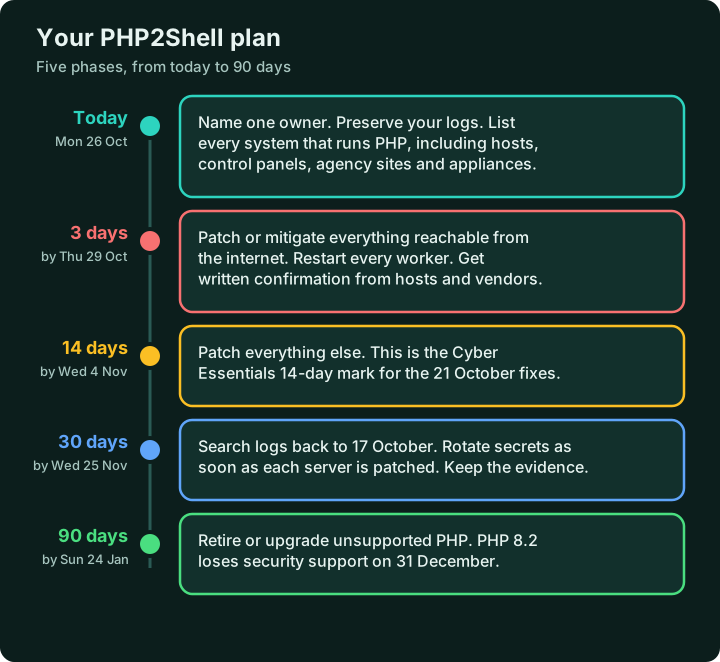
Each phase below has its own section. The dates assume you start today, Monday 26 October. If you are reading this later, keep the order and move the dates.
Where things stand on 26 October
- The fixes have not changed. They are PHP 8.5.12, 8.4.27, 8.3.36 and 8.2.35, all released on 21 October. We checked php.net on 26 October and there is no newer PHP release, although PHP rebuilt its Windows packages that day to fix a separate Brotli bug.
- Attacks have progressed. SecurityWeek reported on 26 October that on 24 October, honeypots run by researcher Adel Karimi recorded 35 shells launched across three of them. The attackers used a four-stage chain of web requests: some exhausted PHP's memory, others leaked memory contents, and the last ran a shell command. No second-stage download was seen.
- Read that result carefully. Karimi said the evidence comes from "the intentionally favorable single-worker mod_php profile" and "is not a measurement of exploit reliability on other worker counts, PHP builds, or applications." On 23 October SecurityWeek reported that one operator expanded its target list to 123 servers, about 57 of which ran PHP, and that none was successfully exploited, and that Sansec said public exploits fail against default PHP installations.
- No real organisation has been confirmed as compromised. SecurityWeek's 23 October report said no successful in-the-wild compromise had been confirmed. Its 26 October report describes successes against honeypots only.
- CISA's position. CISA's alert was updated on 23 October to add a detection rule, and it said it had not observed successful exploitation. As of the morning of 26 October the flaws were not in its Known Exploited Vulnerabilities catalogue, and the National Vulnerability Database record shows no such entry.
- A third advisory. On 23 October PHP published an informational advisory for CVE-2026-115560, in the same session upload progress feature. It calls it "an unlikely RCE vector" that "can only occur under an unusual combination of configuration and application code": an application must set
session.serialize_handlertophp_binaryorphp_serialize, switch it tophpat runtime withini_set()before callingsession_start(), and still have session upload progress enabled. PHP suggestssession.upload_progress.enabled=0until the next regular release. Cloudflare notes the issue "affects fully patched PHP releases, including 8.5.12", so the setting is worth applying even on patched servers. - Vendors are moving at different speeds. Palo Alto Networks is releasing PAN-OS fixes, some already out and others dated 27 to 30 October, and says it is not aware of malicious exploitation against its products. cPanel, Plesk and DirectAdmin have shipped patches, and cPanel and Plesk also released fixed builds for the end-of-life PHP 7.4, 8.0 and 8.1 branches. Red Hat lists RHEL 7 as not affected by CVE-2026-109618 but affected by CVE-2026-109619, with a fix through extended support, and RHEL 6 as out of support scope. On 22 October Cisco said no products were known to be affected while it reviewed more than 30, and Fortinet had cleared two dozen products and was still investigating several others.
- The disruption was real. SecurityWeek reported on 23 October that the UK government said 32 of its services were unavailable and four partly unavailable, mostly because of precautionary measures taken while patches were applied.
- Many systems will not be patched. Qualys figures reported by SecurityWeek put roughly 110 million instances, or 71%, on PHP 5.4 through 8.1, and only 199,000 patched within 12 hours. Cisco Talos estimates that about half of PHP systems will not get a patch.
Our reading: the risk is real but uneven. The confirmed attack chain targeted a deliberately favourable setup, Red Hat says Apache mod_php in its default configuration is at higher risk, and nobody should wait to find out which category they are in. The plan below assumes you patch first and investigate second.
Step 1, today: find out where PHP is
The UK's National Cyber Security Centre says in its own alert that "Organisations using any version of PHP are affected". It asks you to identify systems running PHP, "prioritising internet-facing systems", and adds: "As all versions may be affected, do not limit discovery to outdated PHP versions". CISA and the EU's cyber agencies add that PHP is often embedded in other software, so its presence may not be obvious. Start with one named owner and a list.
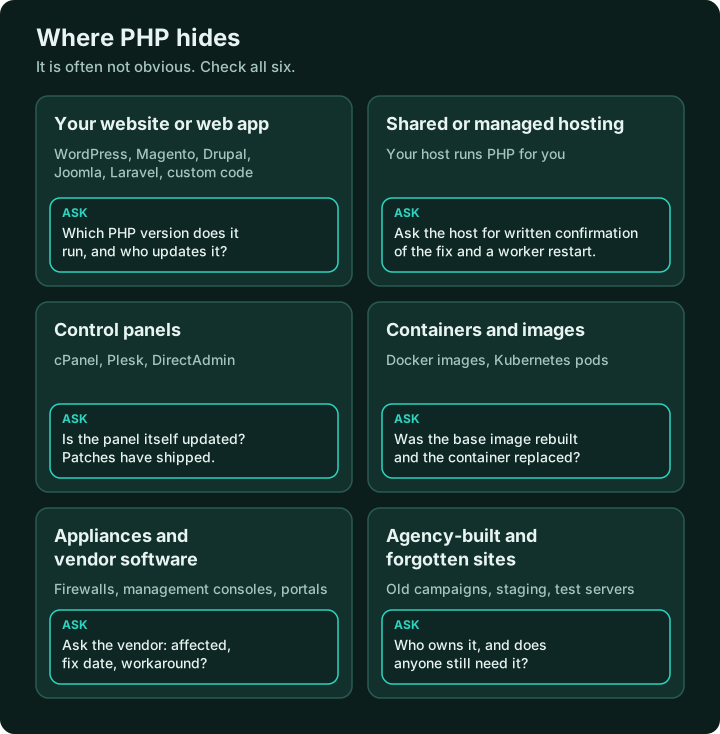
Use a simple table. It becomes your evidence later, so keep it somewhere that is not on the systems you are checking:
| System | Who runs it | Internet-facing? | Fixed and restarted? | Evidence kept |
|---|---|---|---|---|
| Company website (example) | Web agency | Yes | Not yet | Agency email, date, package version |
| Customer portal (example) | Our IT team | Yes | Yes, 27 Oct | Change ticket, check of the live settings |
| Old campaign site (example) | Unknown | Yes | No, find the owner | None yet |
For anything you do not run yourself, the owner column is the person you will ask. That is the next-but-one step.
UK organisations can also sign up for the free NCSC Early Warning service, which the NCSC's alert lists among its further resources.
Step 2, by Thursday 29 October: patch or protect what faces the internet
CISA's instruction is to patch right away, starting with internet-facing systems. The NCSC says the same, then "internal systems". CERT-EU adds that internet-facing applications should be isolated until the fix has been applied and verified. In practice:
- Preserve evidence first. watchTowr advises you to "Preserve PHP and web server logs, configuration snapshots, and any suspicious files before making changes." Logs rotate, so evidence from 17 October can disappear (our note).
- Patch the PHP binary, not just the application. On a server you manage, install your distribution's patched package. On a managed host, a control panel or a vendor product, that is the provider's job and you need their written confirmation.
- Restart every worker. Red Hat is explicit: "Restart every worker after any change. A reload is not sufficient", because existing workers may retain affected state from earlier requests. In containerised deployments, "replace the running container or pod". Rebuild images from the updated base.
- Verify, and do not trust the version string alone. Our first report explains why a fixed package can carry a lower version number. If you need to check the live settings, Red Hat advises "a temporary phpinfo() page rather than php -i, which reports the command-line configuration." Our warning: phpinfo() exposes paths, modules and environment details, so use a random file name, restrict it to your own address if you can, and delete it straight away.
- Do not stop at the internet-facing systems. Do internal ones next. An internal PHP application can still be reached by an infected laptop or a stolen account (our reading).
- Check any official Docker images. The official
phpimage tags8.1,8.0and7.4were last updated in December 2025, November 2023 and November 2022, so an image pinned to one of them will not get the fix from that source. - If you cannot patch yet, apply the vendor's temporary settings, restrict access, or take the system offline. Palo Alto's own advice for its firewalls includes restricting management interface access to trusted internal addresses or a jump box.
- Write down what you did, with the date, who did it and how you checked.
What the temporary settings do and do not do
Red Hat's bulletin, updated on 23 October, and PHP's own announcement now give step-by-step mitigations. Their warnings are the important part. Red Hat says configuration changes "are not a substitute for patching", and PHP says: "There are no complete mitigations, updating is the only safe choice." The table sets out what each setting covers.
| Setting or step | What it does | What it does not do |
|---|---|---|
memory_limit = -1 | Removes the controllable memory-limit failure for CVE-2026-109618. | Does not eliminate it: an underlying allocation failure can still reach the affected code. It also removes a safety cap, so a runaway script can use all the memory on the host. |
post_max_size of 8M (no uploads) or 32M (uploads), with upload_max_filesize lower | Limits the size of requests PHP will accept. | Needs matching limits at the web server or proxy, which PHP says must also cover requests with no usable Content-Length. |
session.upload_progress.enabled = 0 | Fully protects against CVE-2026-115560. On most products it blocks the confirmed session paths for CVE-2026-109619. On RHEL 7's php package it removes exposure to CVE-2026-109619. | Does not block other variants. Applications that use PHP's native upload progress reporting stop receiving progress data. |
fatal_error_backtraces = 0 (PHP 8.5 only) | Blocks the confirmed fatal backtrace path. | Blocks that path only. |
| How to apply them | php_admin_value in the pool or Apache configuration, then restart every worker. | ini_set() and .user.ini are too late. Per-directory settings can re-enable or break things, so audit .htaccess, virtual host php_value and .user.ini. |
Two practical points from the same bulletin. Apply the settings with php_admin_value in the PHP-FPM pool or Apache configuration, "so that applications cannot override them", because "Settings must take effect before request parsing begins, so ini_set() and PHP-FPM .user.ini files are not suitable." And note that session.upload_progress.enabled "is commented out in the shipped /etc/php.ini and defaults to enabled, so the line must be added and set to 0. Uncommenting the shipped line leaves the feature enabled."
A container or memory limit can help as an availability boundary, but PHP warns that killing a whole container or cgroup "can also kill the master and every worker, unless each worker has its own group". Do not use RLIMIT_AS or RLIMIT_DATA, which can cause the very failure these settings try to avoid.
Step 3, today and tomorrow: ask your host or agency in writing
If your website sits on shared or managed hosting, or an agency looks after it, you cannot patch PHP yourself and you should not have to. What you can do is ask a precise question and keep the answer. Control panels have shipped fixes, so a competent provider should be able to answer quickly.
What the big hosts have said
These are the providers' own statements as of 26 October, from their own pages. If your host is not listed, use the message below.
| Provider | Managed or shared hosting | If you run your own server |
|---|---|---|
| GoDaddy | Managed WordPress, Web Hosting and Windows Hosting are patched and need no action. The PHP version number may not change, so check the build date: patched packages show 21 October 2026 or later. | VPS: update PHP (cPanel's EasyApache 4 packages are available), set session.upload_progress.enabled = 0, restart PHP and test upload progress bars. |
| Hostinger | Every plan except VPS is protected. No action needed, including for the third issue. | VPS: update PHP and restart it, and set session.upload_progress.enabled to Off. |
| IONOS | Official PHP updates installed on its systems. Most customers need to do nothing. | If you run your own PHP, for example on a VPS or dedicated server, you must act immediately. |
| Kinsta | WordPress sites protected, including staging. Incident marked resolved on 22 October. It says it found no evidence of breaches related to these vulnerabilities. | Not applicable (managed WordPress). |
| SiteGround | Mitigations on all servers at 07:00 UTC on 21 October and official fixes applied across all servers the same day. No action needed. | Not addressed on its post. |
| OVHcloud | Shared hosting and WebCloud customers automatically get an updated PHP component. | Bare Metal and VPS customers must update PHP and restart services. Its post gives the steps. |
| Cloudflare (a WAF, not a host) | WAF protection on by default for free and paid WAF customers since 03:02 UTC on 21 October. It is not a patch. | Not covered if you changed session.upload_progress.name. |
IONOS also warns that fraudsters exploit incidents like this with fake emails to obtain login details, and says not to run any scripts on your server that do not come from trusted sources. Treat unexpected "PHP security update" emails with suspicion, and go to your provider's site yourself.
Here is a message you can copy:
Subject: PHP2Shell (CVE-2026-109618 and CVE-2026-109619): written confirmation please
Hello [name],
Please confirm in writing, for [our domain or account]:
1. Which PHP version and handler (PHP-FPM, mod_php or other) runs our site?
2. Has it been updated to a fixed release (8.5.12, 8.4.27, 8.3.36 or 8.2.35) or to a vendor package that contains the fix? On what date?
3. Were the PHP workers restarted after the update?
4. If our site runs on PHP 8.1 or older, what is the plan: a vendor backport, an upgrade, or something else?
5. Have you seen attack attempts or signs of compromise on our account, and how far back do your logs go?
6. If you cannot confirm all of this today, when will you?Thank you,
[name]
A good answer gives a date, a version or package name, and confirms the restart. A weak answer says "we are monitoring the situation" or "our firewall protects you" (our view). A firewall can help against known request shapes, but PHP's own announcement says updating is the only safe choice.
Step 4, by 4 November: the Cyber Essentials date
If you hold Cyber Essentials, or are applying for it, the scheme's technical requirements (version 3.3, April 2026) apply. They say software must be updated, including vulnerability fixes, "within 14 days" of release where the vendor describes the fix as critical or high risk, or the vulnerability has a CVSS v3 base score of 7 or above.
PHP2Shell clears that bar several ways. PHP rates both flaws Critical at 9.2 on CVSS v4.0. On CVSS v3.1 the National Vulnerability Database lists 9.8 for CVE-2026-109618 and 8.1 for CVE-2026-109619, and Red Hat lists 8.1 for both, so every published score is above 7. Fourteen days after the 21 October release is Wednesday 4 November. That is our arithmetic, not the scheme's statement. The clock runs from the release of the update you are installing, so a vendor whose fix ships later has a later date (Red Hat's RHEL 7 extended support fix came out on 23 October, which gives 6 November), but waiting for it is not a plan.
Four further points from the requirements:
- Software must be "licensed and supported" and "removed from devices when it becomes unsupported, or removed from scope by using a defined sub-set that prevents all traffic to or from the internet." PHP 8.1 and older are already unsupported by the PHP project, and PHP 8.2 loses security support on 31 December. If you rely on certification, do not wait for the 90-day phase to deal with them (our reading).
- Software must also "have automatic updates enabled where possible".
- The scheme counts "configuration changes" prescribed by the vendor as vulnerability fixes. PHP's advisories still say only an update is complete, so treat settings as a bridge, and ask your certification body how they would view them.
- Where a vendor bundles several fixes in one release, "If such an update covers any 'critical' or 'high risk' issues then it must be installed within 14 days."
We are not assessors. Confirm the detail with your certification body.
Step 5: if you think data was exposed
Being unpatched is not, on its own, a personal data breach. The ICO says a personal data breach "can be broadly defined as a security incident that has affected the confidentiality, integrity or availability of personal data." The question is whether you have evidence, or reason to suspect, that personal data was accessed, lost, altered or made unavailable.
That matters here because Wiz reports that the memory-disclosure flaw can expose passwords, tokens and API keys held in a PHP process, and a server does not have to be taken over for that to happen. The ICO's guidance is clear on the process:
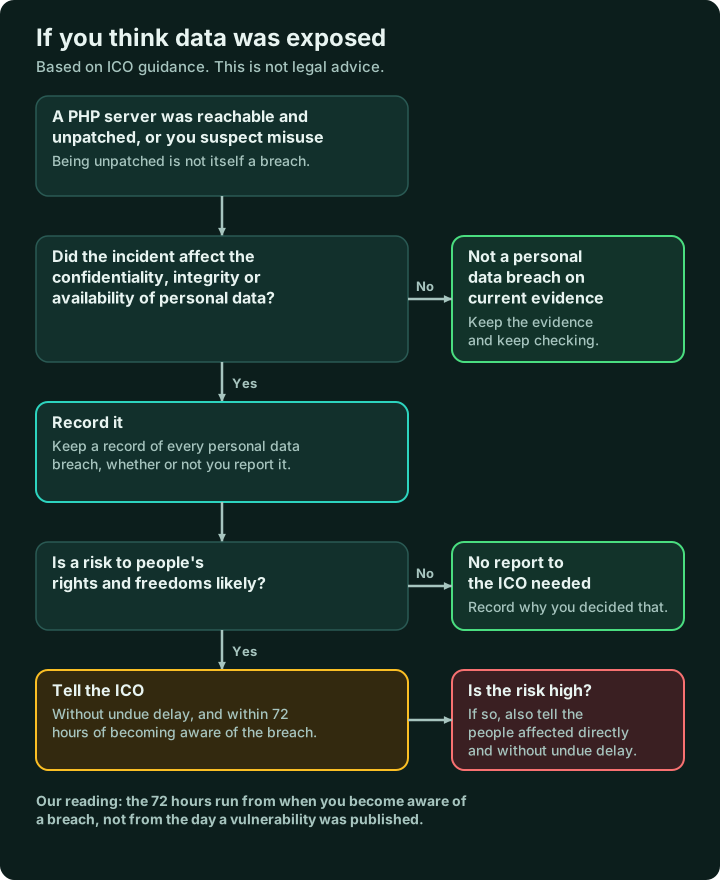
- "You must also keep a record of any personal data breaches, regardless of whether you are required to notify."
- "If a risk is likely, you must notify the ICO; if a risk is unlikely, you don't have to report it."
- "You must report a notifiable breach to the ICO without undue delay, but not later than 72 hours after becoming aware of it."
- If a breach is likely to result in a high risk to people's rights and freedoms, "you must inform those concerned directly and without undue delay."
- If your host or agency is your data processor and it suffers a breach, "it must inform you without undue delay as soon as it becomes aware." Ask them to tell you about anything affecting your data.
The practical steps are the same either way: preserve the logs, bring your data protection lead into the conversation early, and write down your reasoning. This is guidance, not legal advice.
Step 6, by 25 November: hunt, rotate and keep the evidence
- Hunt back to 17 October, when Amazon recorded the first attempt. The NCSC says that if you cannot update or disable a system immediately, you should "assess the system for any evidence of compromise prior to your upgrade or mitigation and look for backdoors installed by an attacker", with help from an NCSC-assured Cyber Incident Response provider if you are not confident. We would do this for any internet-facing server that was unpatched. Our first report lists the signals to search for, and CISA has published a detection rule.
- Checks a non-specialist can make. IONOS, citing the German BSI and CERT-EU, suggests looking at your error logs for unusual worker crashes (segmentation faults) and for "allowed memory size exhausted" errors, at your access logs for unusual multipart upload requests "to pages on your website that do not offer an upload function", and, through FTP or a file manager, for unknown
.phpfiles and unexplained admin accounts in your CMS. If you find evidence of compromise, IONOS recommends restoring a clean backup from before the attacks, updating PHP and restarting all PHP services, and changing all passwords and other credentials such as API keys. - Be careful what you run. JFrog warned that fake proof-of-concept exploits appeared around the time of disclosure, and IONOS says not to run any scripts on your server that do not come from trusted sources. Do not run public exploit code on production systems or your own network. Use vendor and government tools instead, and remember that a version-checking script only compares numbers.
- Rotate the secrets that PHP handled on any server that was reachable and unpatched: database passwords, API keys, session secrets and application keys. Do it as soon as each server is patched, not at the end of the window (our view). This is our recommendation, because you cannot know afterwards which values were read. On a WordPress site that means the database password, the security keys and salts in
wp-config.php, and any mail or API keys stored in plugins (our list, not a source's). - Keep the evidence: the inventory, the written confirmations from hosts and vendors, proof of restarts, and notes of what you searched and found. Auditors, insurers and customers will all ask the same questions.
Step 7, by 24 January: decide what to do about unsupported PHP
This is the hard part, because patching a supported system is a task and moving an unsupported one is a project. PHP 8.1 and older are end of life. PHP 8.2 loses security support on 31 December 2026. Security support runs to the end of 2027 for PHP 8.3, 2028 for 8.4 and 2029 for 8.5. CISA's alert says that organisations that continue to use PHP 8.1 or earlier "should take PHP-based systems offline until they can be patched or updated", and Datadog expects more bugs of this kind to surface, with instances unique to older versions that "will be found and left unpatched". Vendor backports are the exception where they exist, and you should ask for them in writing.
The realistic options, in order of preference:
- Upgrade to a branch with years of support left. Applications written for older PHP may need changes, so test first.
- Use a vendor that still supports the old version. cPanel and Plesk have released fixed builds for PHP 7.4, 8.0 and 8.1. Red Hat, Ubuntu and Debian have shipped fixes for versions in their support windows. AlmaLinux warns that future fixes for retired streams are not guaranteed, so treat this as a bridge.
- Keep it off the internet. If a system cannot be patched or moved, restrict access to a trusted network or take it offline.
- Retire it. Some of the oldest systems are not worth the effort. If the decision is to switch one off, plan the disposal. Our posts on retiring server hardware and wiping network equipment and rotating its keys explain how to do it safely, and the ITAD documentation checklist covers the record. A machine that may have been exposed needs its storage sanitised and every credential on it changed before it leaves your hands.
A briefing you can give your manager today
If you have to explain this to someone who does not work in IT, this is a version that is accurate as of 26 October:
Two serious flaws in PHP, the software that runs a large share of websites, were fixed on 21 October. Attackers have been trying to exploit them since 17 October, and on 24 October researchers saw working attacks on test servers. No real organisation has been publicly confirmed as compromised.
We have named [owner] to list every system that uses PHP, including those run by [host or agency]. We will patch or protect everything facing the internet by Thursday 29 October, with written confirmation from our providers. The compliance date for the Cyber Essentials 14-day rule is 4 November.
We will search our logs back to 17 October, change the passwords and keys on anything that was exposed, and decide by [date] what to do about any system running PHP that no longer receives updates.
What has changed since our first report
We said we would correct the first report if the sources changed. Four things have, and we have updated it:
- Palo Alto Networks had no fixed PAN-OS release and no date on 22 October. Fixes are now being released, with the remaining dates running to 30 October.
- Red Hat has published its mitigation guidance. It lists RHEL 7 as not affected by CVE-2026-109618 but affected by CVE-2026-109619, with a fix through extended support, and RHEL 6 as out of support scope.
- Exploitation: we said no confirmed compromises had been reported. There is now confirmed code execution on honeypots, but still no confirmed compromise of a real organisation.
- A third, lower-risk PHP advisory (CVE-2026-115560) has been published.
Corrections to this plan
26 October, after review. Before the review, an earlier version of this plan said the following. We have corrected it:
- RHEL 7. It said Red Hat lists RHEL 7 as not affected. That is true only for CVE-2026-109618. RHEL 7 is affected by CVE-2026-109619.
- NVD scores. It said the NVD lists 9.8 for both flaws. The NVD lists 9.8 for CVE-2026-109618 and 8.1 for CVE-2026-109619.
- The third advisory. It used Red Hat's wording and left out PHP's conditions. We now quote PHP and include the conditions and the Cloudflare note.
- Branches "with years left". It overstated PHP 8.3, which has security support to the end of 2027, about fourteen months.
- The NCSC's advice. It paraphrased SecurityWeek's summary. We now quote the NCSC's own alert, which says to assess for compromise when you cannot update or disable a system immediately.
- Settings and timing. It gave no values or warnings for the temporary settings, put evidence preservation and secret rotation too late, and used "72 hours" for both patching and the ICO rule.
Summary
- Today: name an owner and list every system that runs PHP, including hosts, panels, containers and appliances.
- By 29 October (three days): preserve your logs, then patch or protect everything facing the internet, restart every worker and get written confirmation from providers.
- By 4 November: patch the rest. That is the 14-day mark for the 21 October fixes.
- By late November: hunt back to 17 October, rotate secrets on anything exposed and keep the evidence.
- If personal data may have been exposed: record it, assess the risk, and notify the ICO within 72 hours of becoming aware if a risk is likely.
- By 31 December for PHP 8.2 and by late January for everything else: upgrade, replace, isolate or retire anything that no longer receives PHP updates. If you rely on Cyber Essentials, do the unsupported systems sooner.
What we could not confirm
- Whether anyone has been compromised outside a test environment. None has been confirmed publicly.
- How reliable the attack chain is outside favourable setups. Karimi and others caution against drawing wide conclusions.
- The final fix dates for every appliance vendor. Palo Alto lists dates, but others were still checking.
- Whether the third PHP advisory will change guidance. PHP says it will publish a full advisory with its next release.
- The status of any host that has not published its own statement. Use the message above to ask.
This is a fast-moving incident and we will keep this plan up to date.
Sources
- Government guidance: UK NCSC alert and CISA alert
- PHP project: security announcement, 21 October and informational advisory, 23 October
- Providers: GoDaddy, Hostinger, IONOS, Kinsta, SiteGround, OVHcloud and Cloudflare
- Exploitation and response: SecurityWeek, 26 October, SecurityWeek, 23 October and SecurityWeek, 22 October
- Vendors: Red Hat bulletin RHSB-2026-013 and Palo Alto Networks advisory
- PHP project: supported versions and the advisories for CVE-2026-109618 and CVE-2026-109619
- Regulators and schemes: ICO guide to personal data breaches and Cyber Essentials requirements v3.3
- Earlier reporting: Help Net Security and our first report
Nanosoft Team and PK Sharma
Writer at Nanosoft - covering ITAD, data security, and sustainable technology lifecycle management.
Found this useful? Share it.