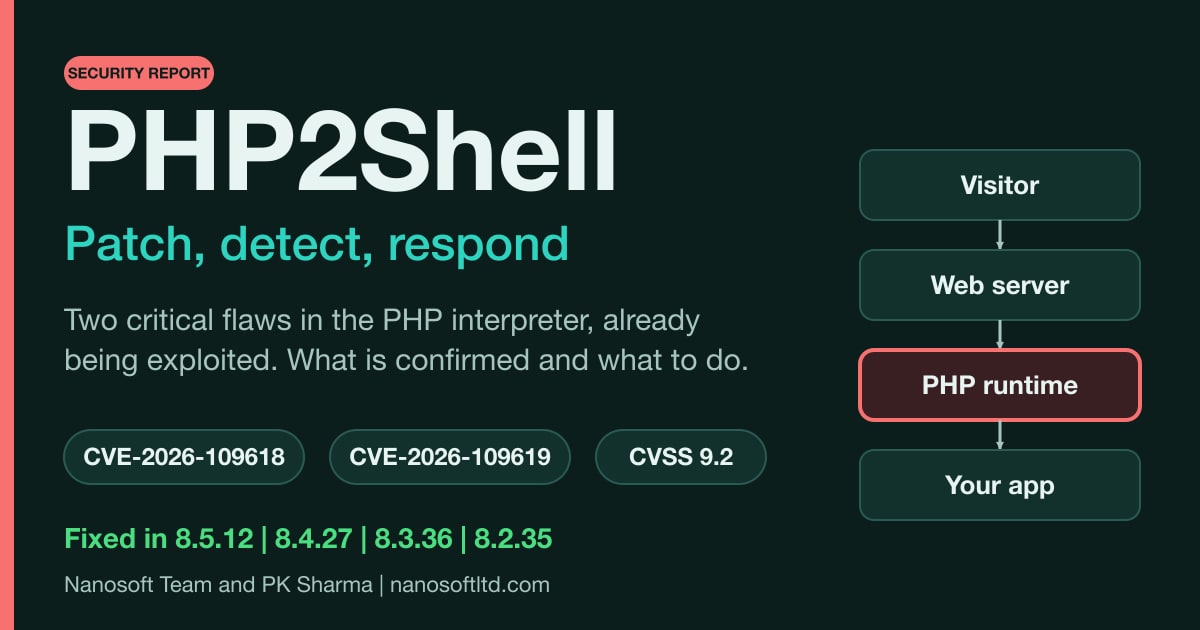
On Wednesday 21 October, the PHP project shipped emergency fixes for two critical flaws in the PHP interpreter itself. They are tracked as CVE-2026-109618 and CVE-2026-109619 and nicknamed PHP2Shell. An unauthenticated attacker can reach them over ordinary web requests, and one of them can also leak the contents of a running server's memory. Attackers were probing for them four days before the fix, and broad exploitation has been reported since.
This is a working report, not a news summary. It sets out what is confirmed, how each flaw works, how exposed different setups really are, what attackers have been doing, how to check whether you are patched, how to detect attempts and what to do if you cannot update. Where sources disagree, or where a claim could not be verified, we say so. Everything here is as of 22 October 2026, and this is a fast-moving incident.
At a glance
- Two flaws: CVE-2026-109618 (out-of-memory corruption) and CVE-2026-109619 (stale global state, with memory disclosure).
- Fixed in: PHP 8.5.12, 8.4.27, 8.3.36 and 8.2.35, released 21 October 2026 at 14:00 UTC. Older branches are affected too.
- What an attacker needs: network access to a web server running PHP. No account, no login, no user interaction.
- What they can do: run code as the web server's user, or read live process memory.
- Exploitation: first attempt recorded on 17 October. Amazon says PHP2Shell is now "being broadly exploited in the wild."
- The only complete fix: update PHP and restart every worker. Configuration changes only reduce exposure.
- Not affected: per Red Hat, systems with no PHP installed, or that do not expose PHP to untrusted web requests.
What was disclosed
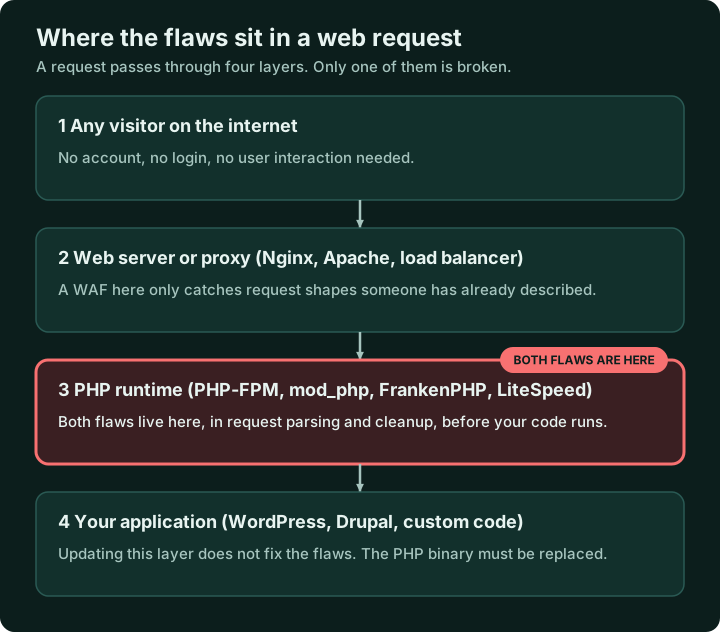
Both flaws sit in the PHP runtime, not in any application built on it. That is why updating WordPress, Drupal, Magento or your own code does not fix them. The PHP binary has to be replaced.
CVE-2026-109618: out-of-memory corruption
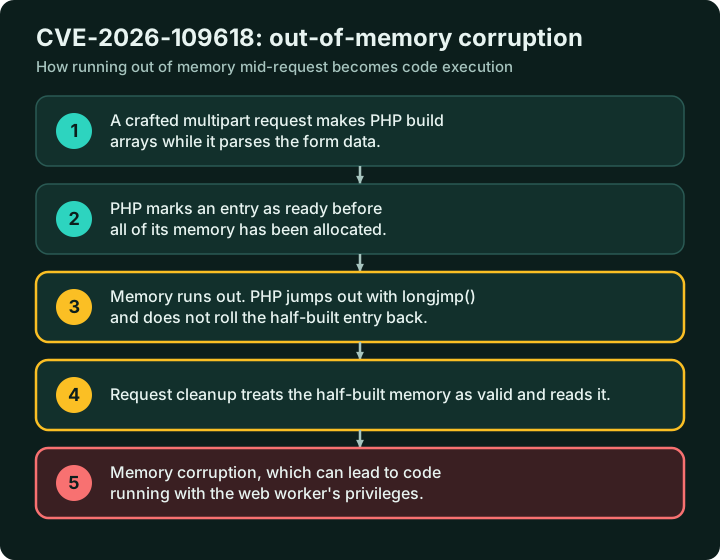
When PHP parses a form submission or file upload, it builds arrays in memory as it goes. PHP's advisory, titled "RCE via OOM corruption", explains that PHP uses longjmp() to leave the current context when it runs out of memory, which can leave request memory in an invalid state that shutdown then reads.
Red Hat's description of the same bug is the clearest: PHP "records certain state as ready for use before all required memory allocations complete. If an allocation fails due to memory exhaustion, the incomplete state is not rolled back. Subsequent cleanup operations treat the uninitialized memory as valid, leading to memory corruption."
The advisory names three routes through multipart parsing that can push PHP out of memory: missing content-length checks, an unlimited number of headers per part, and empty file controls with nested field names. The fix replaces the abrupt jump with a delayed "soft" out-of-memory condition and an immediate "hard" one, so that half-built structures are not cleaned up as if they were complete.
CVE-2026-109619: stale global state
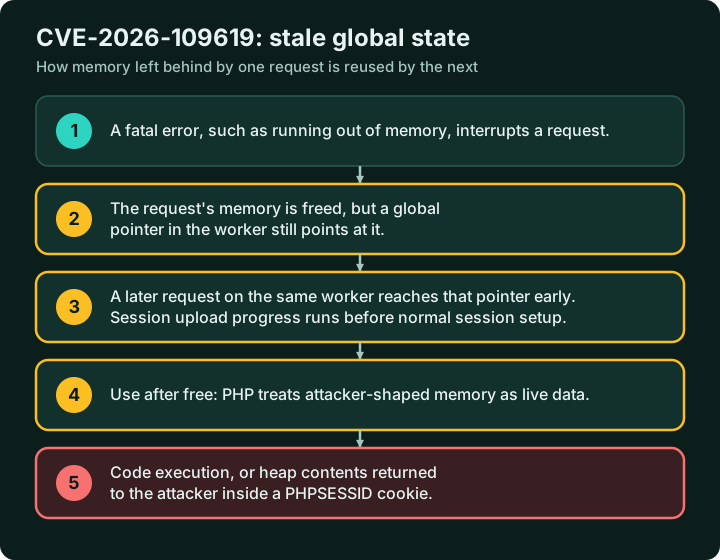
PHP keeps various global state, including error, session, object and extension state. This advisory, titled "RCE via stale global state", describes request-owned data that survives after its memory has been freed, so that a later request on the same worker can reach it. It names two routes:
- Session upload progress. The advisory notes that it "can reach session handling before ordinary session initialization." watchTowr points out that this is "a feature turned on by default", and that it is "not the only path to exploitation."
- Fatal error backtraces, on PHP 8.5, where fatal error reporting stores request-owned backtrace state.
The advisory describes the result as "unauthenticated heap use-after-free, memory disclosure and remote code execution with the web worker's privileges."
The memory disclosure
Wiz, whose researchers helped find the flaws, describes the disclosure part in more detail. PHP "URL-encodes the reclaimed heap contents into a PHPSESSID response cookie", giving an attacker "unauthenticated disclosure of an attacker-sized region of live worker memory." Wiz says this can expose "passwords, tokens, and API keys" held in the process. It works "even when the application never calls session_start()", and it works without achieving remote code execution. Wiz combined the disclosure with the use-after-free to achieve unauthenticated remote code execution on WordPress, Drupal and Joomla.
This matters for the clean-up. A server does not have to be taken over for its secrets to leak.
How exposed is your setup?
The sources agree on the broad picture and differ on how easy exploitation is in practice.
- Scope. Help Net Security reports that "Every PHP installation that serves web requests is affected, including PHP-FPM, Apache with mod_php, php-cgi, FrankenPHP and LiteSpeed," with mod_php facing the greatest danger.
- The researchers' view. Calif, which reported the first flaw, says the exploitation paths "depend on the PHP version and SAPI but are always exploitable under default configurations." It found reliable exploits against both mod_php and PHP-FPM, and demonstrated one against Nginx with PHP-FPM. The earliest affected code dates to PHP 5.4.0.
- Red Hat's more cautious view. Its bulletin says "Reliable exploitation requires precise heap manipulation and timing", that standard RHEL deployments use PHP-FPM, and that FPM workers "exit on early initialization failures before reaching the corrupted structures, making remote code execution difficult in practice." Environments running mod_php with default configuration "are at higher risk."
Our reading: Red Hat describes one path against one server model. The researchers have working exploits on both, and real attackers have been sending exploit-shaped traffic since before the patch. For anything reachable from the internet, treat this as critical.
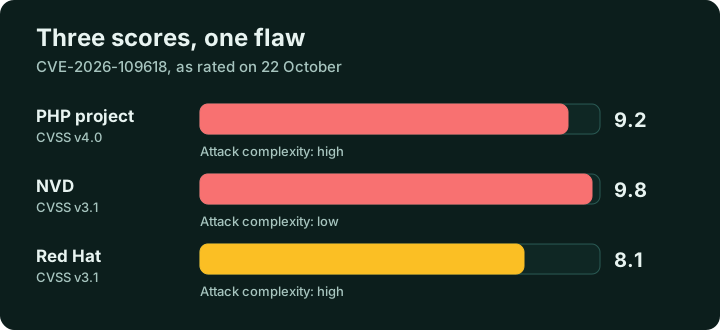
Why the scores differ. For CVE-2026-109618, PHP rates it 9.2 (Critical) on CVSS v4.0, the National Vulnerability Database lists a 9.8 on CVSS v3.1, and Red Hat rates it 8.1 (Important) on v3.1. The vectors show the main difference: the NVD scores attack complexity as low, while PHP and Red Hat score it as high. The scores are measuring the same flaw with different assumptions, and none of them says it is safe to wait.
Where it came from
The story of how these flaws surfaced is useful context, because it shows how long a weakness can sit unexploited. This timeline comes from the write-ups by Calif and Wiz.
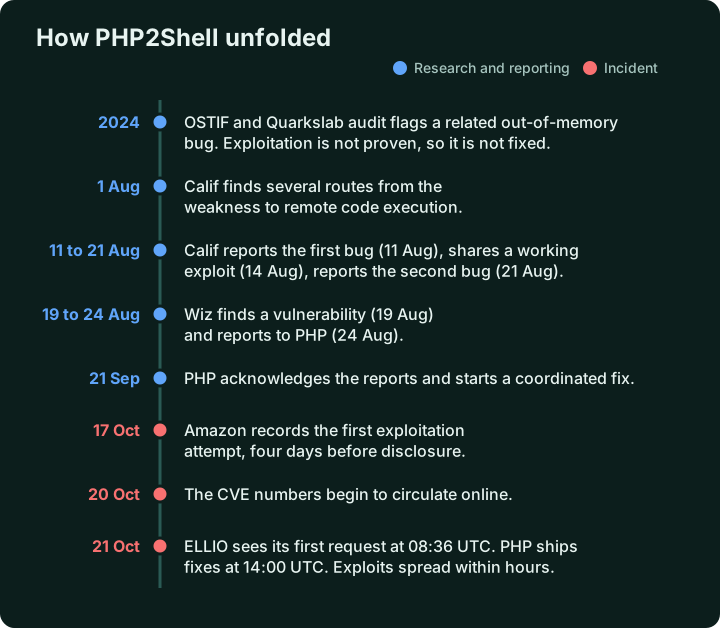
- 2024. A security audit by OSTIF and Quarkslab identified a related out-of-memory bug. Calif's account says "exploitation was not proven, hence the bug was not fixed."
- 1 August 2026. Calif discovers multiple paths from the weakness to remote code execution. It says it "was not expecting to find anything critical" and found the first bug a few days into the audit, without a special harness or access to models that were not generally available.
- 11 August. Calif reports the first bug to PHP. A working remote code execution proof of concept follows on 14 August, and PHP confirms it on 15 August. Calif reports the second bug on 21 August.
- 19 to 24 August. Wiz finds the first vulnerability, confirms remote code execution against Drupal on 20 August and WordPress on 21 August, and reports to the PHP security team on 24 August.
- 21 September. PHP acknowledges the reports and begins developing a coordinated fix.
- 21 October. Patched releases and public disclosure.
Wiz's own summary of the role of AI tools, as quoted by Help Net, is that "Frontier AI models substantially reduced that barrier, turning a longstanding flaw into an exploit." BleepingComputer credits the discovery to researchers at Calif, OpenAI and Wiz, and Red Hat thanks the same three groups and the PHP project for their coordination.
What has happened since: the timeline
- Saturday 17 October. Amazon Threat Intelligence records an exploitation attempt against its honeypots, four days before public disclosure, from a commercial anonymisation network.
- Tuesday 20 October. The CVE numbers begin circulating online. Accounts differ on how much technical detail was public at that point.
- Wednesday 21 October. PHP moves the release forward from the planned Thursday. The threat-intelligence firm ELLIO says the first PHP2Shell request reached its sensors at 08:36 UTC, five and a half hours before the fix was public. The fixes ship at 14:00 UTC.
- Within hours. Amazon says additional proof-of-concept exploits appeared "within hours" and were used against its sensors almost immediately. Cloudflare's CTO said it was already seeing early attacks, and Cloudflare added initial WAF rules for the known exploit vectors.
How the details got out before the release is disputed between the parties involved, and we have not repeated claims we cannot verify.
Amazon's lesson from the event is worth taking to your own patch policy: "A 7-day or 30-day SLA assumes a delay that no longer exists." It also advises starting any investigation from the earliest known exploitation, not the disclosure date, which here means 17 October.
What attackers have actually sent
ELLIO, which runs a network of sensors, published detailed observations from 21 October. They are one vendor's view, but they are the most concrete description of real traffic so far.
- Volume. By 23:00 UTC, 33 addresses had sent 743 requests carrying the session upload progress field. One address sent 164 of them in twenty minutes.
- Targets. Requests went to
/upload.php, and then/,/app/upload.phpand/api/endpoint.php. Attackers are guessing at upload endpoints, but the flaw does not need one to exist. - Shape. Multipart requests with a part named
PHP_SESSION_UPLOAD_PROGRESS, content types such astext/plain,image/jpegandapplication/octet-stream, and either hundreds of empty file fields or field names nested many levels deep. - Size. The median request body was 10 megabytes for two hours, and the largest was 37.4 megabytes. After 23:00 nothing topped 77 kilobytes.
- After exploitation. ELLIO says the shell that gets written "takes its orders from a request parameter and fetches nothing", and describes a second-stage Mirai botnet variant. At the time of its post, it said "No public source has reported a confirmed compromise yet."
Amazon is similarly careful. Its payloads varied, suggesting multiple actors, and it says "it's unclear if any of these attempts would have succeeded in real-world systems." That is a reason to investigate, not a reason to relax.
Step 1: find every PHP runtime
The Dutch National Cyber Security Centre has published a community repository on PHP2Shell. Its first recommended step is to "Identify PHP-based applications and their runtime versions." It keeps inventory lists of products that bundle PHP, a folder of cPanel EasyApache 4 mitigation material, and says plainly that it is incomplete and still being expanded.
Our practical list of places to look:
- Web servers running PHP-FPM, Apache with mod_php, FrankenPHP or LiteSpeed.
- Container images and base images in your registries, not just running containers. Red Hat's advice is that "any customer containers should be rebuilt when the base images are updated."
- Hosting control panels and admin consoles, which often carry their own PHP.
- Vendor appliances with a web interface, which you cannot patch yourself and must ask the vendor about.
- Staging, test and forgotten machines. Datadog also notes that self-compiled runtimes "need separate inventory checks".
Red Hat's scoping point helps narrow this down: systems that do not have PHP installed, or that do not expose PHP to untrusted HTTP requests, are not affected.
Appliances are not a hypothetical category. Palo Alto Networks has published an advisory on these flaws that lists PAN-OS and Panorama among the affected products, with no fixed release and no date given when we checked. Help Net Security's updates add that Fortinet and Cisco were still checking 12 and 31 products respectively on 22 October and had not confirmed a vulnerable one. If an appliance in your estate has a web interface, ask its vendor in writing.
Step 2: do not trust the version string alone
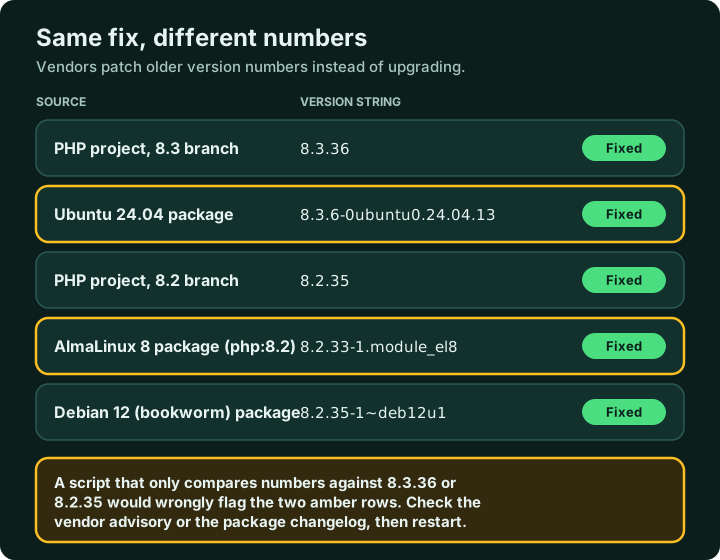
Vendors fix security bugs in older versions without changing the headline number, and the evidence is on the vendors' own pages. Ubuntu 24.04's fixed package is php8.3 8.3.6-0ubuntu0.24.04.13, which looks far older than the upstream fix in 8.3.36. AlmaLinux's fixed packages include php-8.2.33-1.module_el8, below upstream's 8.2.35. Both are patched. A script that simply compares numbers would flag them as vulnerable.
Tools that read the version from the outside have a second limit. OpenAI has published a php2shell-checker that reads the version from HTTP headers or from php -v and returns OK, VULNERABLE or UNKNOWN. Its own README says that OK is a version comparison, not verification of a security fix, and that UNKNOWN does not mean the target is patched. A server that hides its version, which is good practice, will often return UNKNOWN.
Our advice: the command-line PHP and the PHP serving your website can be different builds, so php -v on its own is not proof about the web workers. Ask your distribution vendor for the patched package version, and where the changelog lists CVE numbers, check for them. Adjust the package name to your system:
rpm -q --changelog php-fpm | grep -E "CVE-2026-109618|CVE-2026-109619"
apt-get changelog php8.3-fpm | grep -E "CVE-2026-109618|CVE-2026-109619"
Vendor patch status on 22 October
These come from the vendors' own security trackers and change quickly, so check the live pages before relying on them.
| Vendor | Status when checked |
|---|---|
| Debian | bookworm: php8.2 8.2.35-1~deb12u1 (DLA-4848-1). trixie: php8.4 8.4.27-1~deb13u1 (DSA-6574-1). bullseye: not listed. |
| Ubuntu | Fixed on 22.04 (php8.1), 24.04 (php8.3) and 26.04 (php8.5). Older LTS releases fixed through Ubuntu Pro. USN-8948-1 and USN-8948-2. |
| Red Hat Enterprise Linux | RHEL 10: php 8.3.36 and php8.4 8.4.27. RHEL 9: php:8.2 and php:8.3 modules, and php 8.0.30. RHEL 8: php:8.2 and php:7.4 modules. The RHEL 9 php:8.4 module was still listed as affected, RHEL 6 and 7 were under investigation, and Red Hat says mitigation guidance will come in a later update. |
| AlmaLinux | Patched packages for every PHP stream it ships on AlmaLinux 8, 9 and 10. It warns that future fixes for retired streams are not guaranteed. |
Step 3: patch, then restart
The advisories are unambiguous. For CVE-2026-109618, updating "is the only complete mitigation". For CVE-2026-109619 it is "the only reliable mitigation". PHP core developer Gina Peter Banyard put it the same way: "applying the official security patches is the only permanent defense."
Fixed releases are 8.5.12, 8.4.27, 8.3.36 and 8.2.35. On a distribution that ships PHP, the vendor's patched package is the right route. AlmaLinux, for example, tells administrators to run sudo dnf clean metadata && sudo dnf upgrade 'php*' and then restart PHP-FPM, or Apache where mod_php is used.
The restart matters. A process keeps running the old code until it is restarted, and watchTowr's advice is to restart every PHP worker so the fix takes effect across the environment. A common check afterwards is to look for processes still mapping a replaced PHP library:
grep -i deleted /proc/*/maps | grep -i phpAny hit means a process is still running code that has been replaced on disk.
Branches that no longer get fixes. PHP 8.1 and older are end of life. The project has published minimal source backports for 7.4, 8.0 and 8.1, and some distributions have patched older streams. PHP 8.2 itself has security support only until 31 December 2026, so patching it is a stopgap and the upgrade should be planned now.
Third-party repositories. Help Net reports that users of rpms.remirepo.net should switch to distribution packages or build from source rather than wait for it.
If you cannot patch today
These are temporary measures from PHP's advisories and the researchers. As Datadog puts it, "none of them fully fixes the vulnerabilities."
- CVE-2026-109618: set and enforce
memory_limit=-1at the administrator level. Set a conservativepost_max_size, enforce request size limits at your front end, lowermax_input_nesting_level, and limit the number of input variables, multipart parts, headers and uploads. Block multipart requests on routes that do not need them. PHP explicitly warns against usingRLIMIT_ASorRLIMIT_DATAto cap memory. - CVE-2026-109619: set
session.upload_progress.enabled=0administratively and, on PHP 8.5,fatal_error_backtraces=0, then restart every worker. The advisory also suggestspm.max_requests=1if performance allows. - By server type, Calif's guidance is both settings for PHP-FPM, and
memory_limit=-1alone for mod_php. - At the edge, Datadog advises flagging "unusually long form field names and unexpected control bytes in form submissions", and checking how your inspection engine handles large request bodies.
Calif warns that "Setting memory_limit=-1 removes PHP's memory cap, increasing the risk of memory exhaustion." A runaway script could use all the memory on the host. Pair the setting with a container or cgroup limit, and treat the whole arrangement as short-term.
For systems that cannot be fixed at all, Help Net reports that the UK National Cyber Security Centre is urging organisations to consider taking them offline until they can be. watchTowr's advice is to restrict internet access to PHP systems that cannot be updated immediately.
How to detect attempts
Searching for signals works best across several layers at once, because no single one is reliable on its own.
| Where | What to look for |
|---|---|
| Web server and proxy logs | POST requests containing PHP_SESSION_UPLOAD_PROGRESS. Multipart requests with hundreds of empty file fields or deeply nested field names. Very large form field names or binary control bytes in a form field. Request bodies far larger than your application normally receives. |
| PHP error log | PHP Fatal error: Allowed memory size of ... bytes exhausted ... in Unknown on line 0. The "Unknown on line 0" location means PHP failed during request initialisation, before any script started running. |
| Web server error log | Worker crashes such as AH00052: child pid ... exit signal Segmentation fault (11), and, per Wiz, unusual multipart requests followed by memory-limit errors or repeated HTTP 500 responses. |
| Responses | Unexpectedly large or malformed PHPSESSID response cookies, which Wiz identifies as a sign of the memory disclosure, and unexplained PHP worker churn. |
| Hosts | A shell started by a web worker, such as an Apache or PHP-FPM process launching sh or bash. Datadog calls this "the most direct evidence of successful exploitation". Also unexpected file changes in web directories and new scheduled jobs. |
| Network | Outbound connections from web servers that you cannot explain (our addition). ELLIO also advises restricting outbound DNS to your own resolvers, which brings a bot's lookups back into view. |
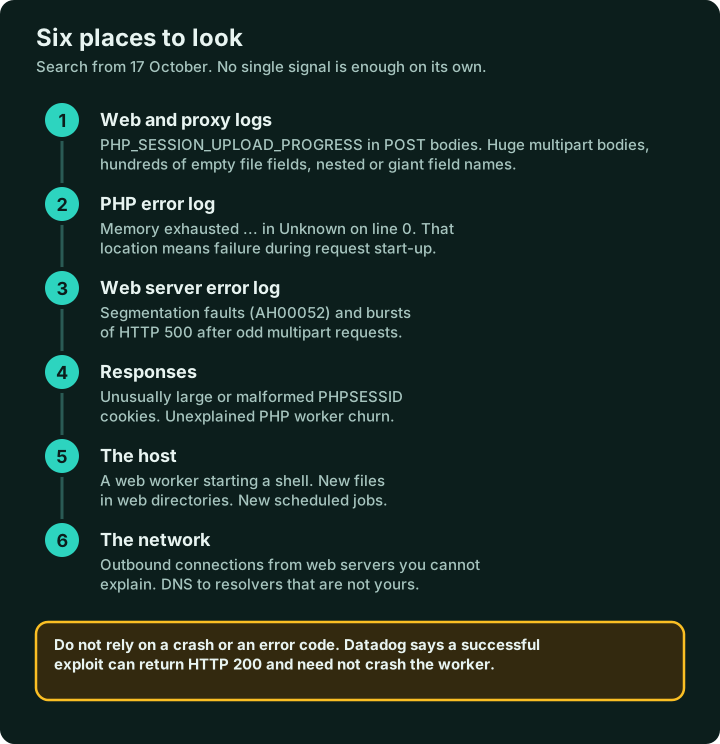
Do not depend on crashes or error codes. Datadog says its refined exploit "returns HTTP 200 with the memory-exhaustion error in the response body", and that "A successful exploit doesn't necessarily crash the worker or return an error." It advises against detections that rely on a specific HTTP status or a worker crash. It also cautions that memory exhaustion alone does not prove an attack, because legitimate workloads can cause it.
Known addresses. Amazon published six addresses seen on 17 and 21 October: 103.216.220.92, 31.223.184.166, 37.19.200.5, 134.209.159.64, 103.114.163.188 and 95.217.98.37. They are shared anonymisation infrastructure, so Amazon recommends investigating any contact with them rather than simply blocking them. ELLIO names a staging host at 92.118.112.100, on AS215540.
Search back to 17 October. Amazon recommends that date as the start of any investigation. For hosts-based tooling, Datadog's Workload Protection includes rules for PHP applications executing a shell, and it suggests building a baseline of the external commands your application runs on purpose so that anything else stands out.
One point of ours on what you will not see. A memory-disclosure attack of the kind Wiz describes need not crash a worker or start a shell, so the absence of those signs is not proof of safety on an unpatched, internet-facing server.
If a server was exposed
- Preserve evidence first. watchTowr advises keeping logs and configuration before making changes.
- Treat the secrets it handled as exposed. Wiz says the memory disclosure can reveal passwords, tokens and API keys. On a server that was unpatched and reachable from the internet, rotate the database passwords, API keys, session secrets and application keys its PHP processes used. This is our recommendation, because there is no way to know afterwards which values were read.
- Check for a foothold. watchTowr lists web shells, unexpected cron jobs and new accounts. We would add SSH authorised keys, service definitions and the web root.
- If you find signs of exploitation, isolate the host and bring in an incident response provider before the server returns to service.
Where this meets IT disposal
We are an IT asset disposition company, and this advisory touches our work in two ways.
First, the servers you cannot patch. A machine on an end-of-life operating system running an old PHP branch is a retirement decision, not an update. If the answer is to switch it off, plan the disposal rather than leaving it in the rack. An unpatchable server that stays on the network is the one most likely to be attacked.
Second, an exposed server holds secrets. Before a server leaves your control, whether it is sold, returned or recycled, its storage needs sanitising with a per-drive record, and every credential it held needs changing. Our posts on retiring server hardware and wiping network equipment and rotating its keys cover how, and our ITAD documentation checklist covers the record.
Common questions
We keep WordPress fully updated. Are we safe? No. The flaws are in the PHP interpreter underneath, and Wiz achieved remote code execution on WordPress, Drupal and Joomla. The PHP binary has to be updated.
We run PHP-FPM behind Nginx. Does that protect us? Not reliably. Calif demonstrated an exploit against exactly that setup. Red Hat says one path is harder to exploit against FPM, but it is shipping fixes for FPM deployments too, and CVE-2026-109619 is a separate flaw with its own memory disclosure risk.
Our WAF is switched on. It can help with known request shapes, and Cloudflare has added rules. But PHP's advisories say an update is the only complete mitigation, and a WAF only sees the traffic patterns someone has already described.
Is php -v enough to prove we are patched? No. Vendors backport fixes without changing the upstream version number, as the Ubuntu and AlmaLinux packages above show.
We changed the PHP settings. Do we still need to update? Yes. The settings reduce exposure while you update. They do not fix either flaw.
We do not run PHP at all. Then, per Red Hat, you are not affected by these flaws. Check any appliances, hosting panels and containers first, because they often carry PHP that nobody listed.
Summary
The steps in order, first as a flowchart and then as a list.
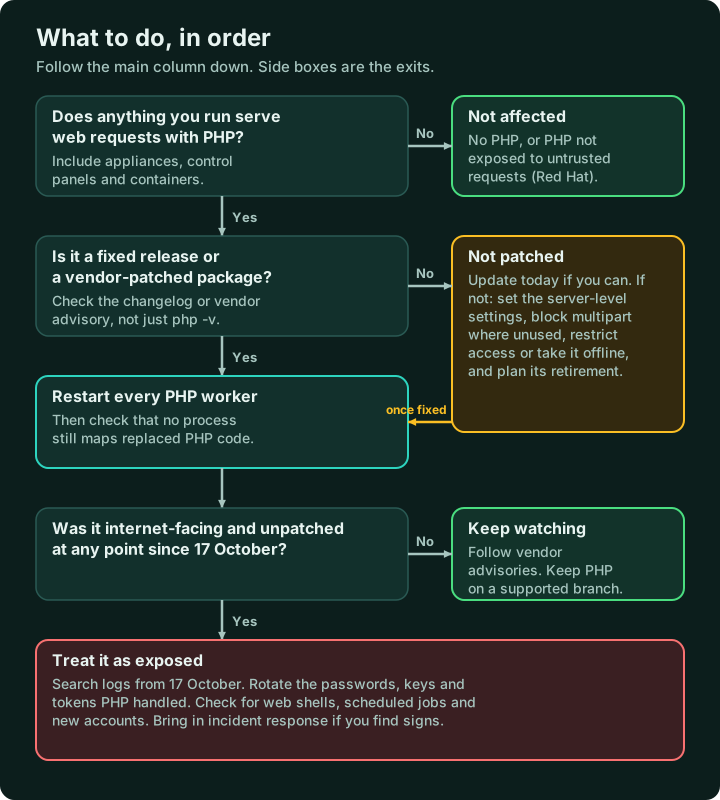
- Find every PHP runtime, including containers, control panels and vendor appliances.
- Patch the interpreter to 8.5.12, 8.4.27, 8.3.36 or 8.2.35, or to your vendor's patched package, and restart everything.
- Verify from the vendor's changelog, not just the version string.
- If you cannot patch, apply PHP's temporary settings, restrict or take the system offline, and plan its retirement.
- Search logs from 17 October across the signals above, and do not rely on crashes or error codes.
- On exposed servers, rotate the secrets PHP handled and check for a foothold.
What we could not confirm
- Whether any of the attacks seen so far have led to confirmed compromises. ELLIO and Amazon both stop short of saying so.
- How the details became public before the release. The parties involved dispute it.
- Red Hat's mitigation guidance, which it says will come in a later update, and the status of the RHEL 9 php:8.4 module and RHEL 6 and 7.
- When vendor appliance fixes will arrive. Palo Alto Networks lists no date, and Fortinet and Cisco were still assessing their products.
We will correct this report if the sources change.
Sources
- PHP security advisories: CVE-2026-109618 and CVE-2026-109619
- Researchers: Calif and Wiz
- Vendors: Red Hat bulletin RHSB-2026-013, Debian, Ubuntu, AlmaLinux, NVD entry
- Threat intelligence and detection: Amazon, Datadog, ELLIO, watchTowr
- Vendors: Palo Alto Networks advisory
- Government and community: NCSC-NL repository, OpenAI php2shell-checker
- News: Help Net Security, BleepingComputer
Nanosoft Team and PK Sharma
Writer at Nanosoft - covering ITAD, data security, and sustainable technology lifecycle management.
Found this useful? Share it.