Deleted Does Not Mean Gone: The Science Behind Data Recovery and What It Means for Your Business
Imagine a library where, instead of throwing books away, you simply remove their listing from the catalogue. The books are still on the shelves. Any visitor who knows how to walk the aisles can find them. The catalogue just does not acknowledge they exist anymore.
That is exactly what happens when you delete a file from a computer.
The file does not disappear. The operating system removes its entry from the file system index and marks the space it occupies as available for future use. The data itself stays exactly where it is, untouched, on the storage medium, until something else is written to that precise location on the disk. And on any storage device that is not constantly being written to, that can take a very long time indeed.
This is not a flaw. It is by design. The reason computers do not zero out deleted files is speed. Removing a catalogue entry takes a fraction of a second. Overwriting gigabytes of actual data takes considerably longer. The operating system prioritises performance, which means deletion and erasure are two entirely different things.
Key things you will understand after reading this
Why deleting a file does not remove the data from storage.
How forensic recovery tools find files you thought were gone.
Why SSDs behave differently from traditional hard drives.
What the three levels of certified data destruction actually mean technically.
What it takes to make data genuinely, verifiably, permanently unrecoverable.
How a hard drive actually stores data
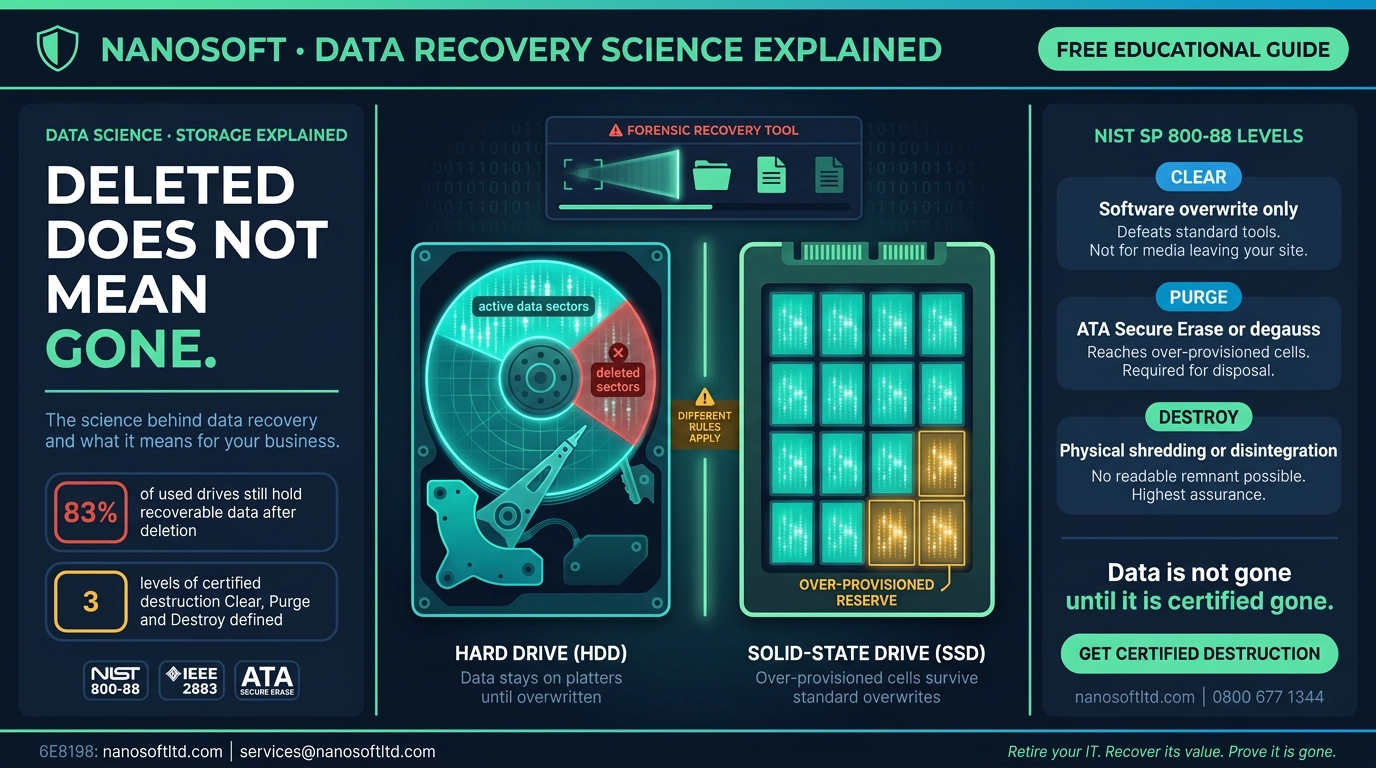
A traditional hard disk drive (HDD) stores information magnetically on spinning platters. Imagine the platter as a vinyl record, except instead of grooves, it has billions of microscopic magnetic domains that can be oriented in one of two directions, representing the ones and zeros of binary data. A read/write head floats nanometres above the surface, magnetising those domains to write data and detecting their orientation to read it back.
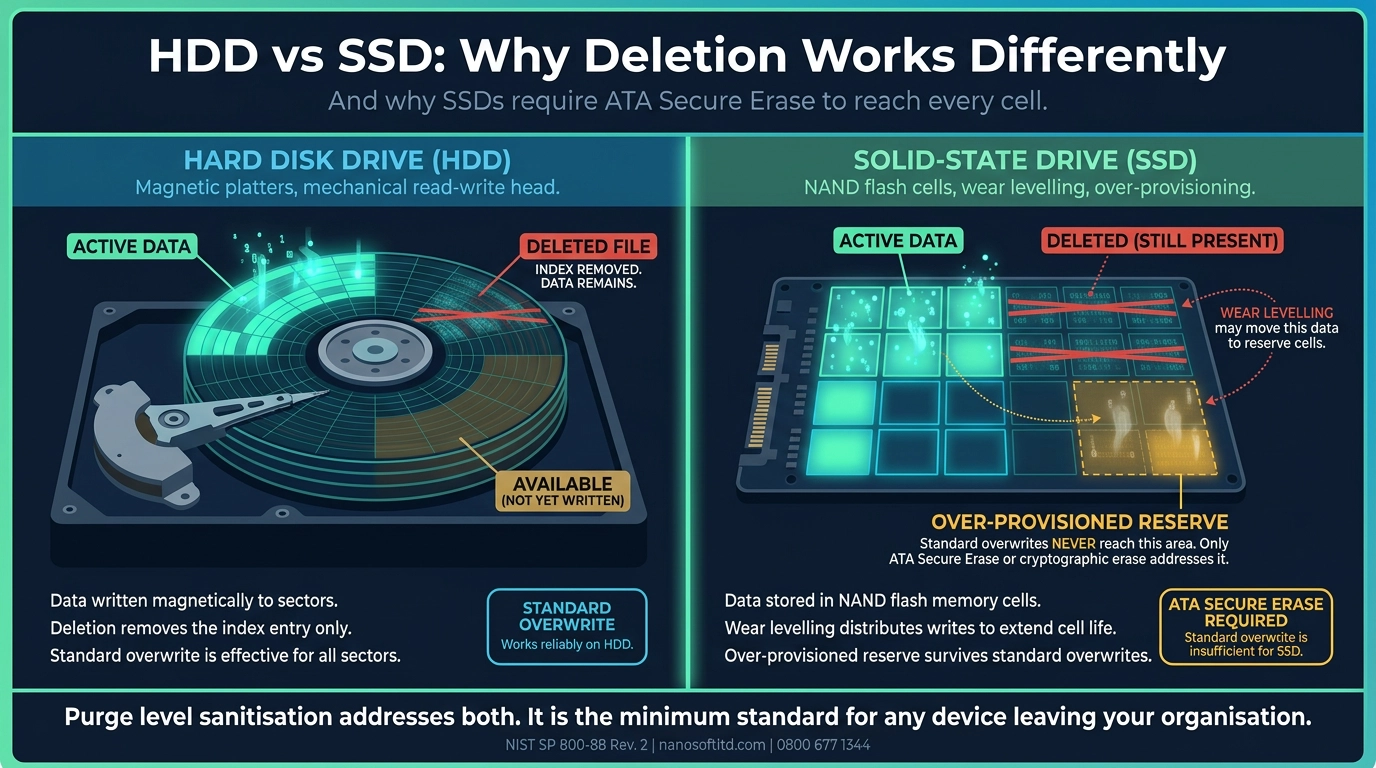
When you save a file, the file system picks available sectors on the platter and writes the data to them. It records in its index exactly which sectors the file occupies, so it can find the data later. When you delete the file, the file system removes that index entry and flags those sectors as free. The magnetic data in those sectors is unchanged. The grooves, to continue the vinyl analogy, still contain the music.
Forensic recovery software does not rely on the file system index. It reads the raw sectors directly, looking for the characteristic header patterns that different file types begin with. A JPEG image has a known starting signature. A Word document has another. A PDF has another. Recovery tools scan sector by sector, recognise these signatures, and reconstruct files from the raw magnetic data whether or not the file system knows they exist.
This is how investigators recover files from computers that have been formatted, how digital forensics labs retrieve evidence from devices whose owners believed they had deleted everything, and how the tools available freely online allow anyone to scan a secondhand hard drive and read its previous owner's files.
Why SSDs are a more complicated problem
Solid-state drives (SSDs) do not use spinning platters. They store data in NAND flash memory cells, and the way they manage that storage creates a challenge that makes standard data overwriting insufficient.
To extend the lifespan of the storage cells, SSDs use a technique called wear levelling. Instead of writing repeatedly to the same cells, the drive spreads write operations across all available cells evenly. This means that when you write a new file over a deleted one, the SSD may write the new data to completely different cells from the ones the original file occupied. The original data may sit in cells that the wear-levelling algorithm has not touched in months.
SSDs also over-provision storage, maintaining a reserve of cells beyond the advertised capacity that the user never sees directly. When the SSD needs to move data during wear levelling or error correction, it uses this reserve. Data from the accessible storage can end up in the over-provisioned area without the user or the operating system being aware of it.
A standard overwrite command tells the SSD to write new data to the logical addresses it can see. It does not necessarily touch the cells that hold the original data in the over-provisioned reserve. This is why the same deletion or overwrite approach that works adequately on an HDD does not provide equivalent assurance on an SSD.
How forensic tools actually work
The tools used in digital forensics to recover deleted data are not exotic or expensive. Several are freely available. Recuva is a consumer tool that can scan a drive and list recoverable files in minutes. EnCase and FTK are professional forensic platforms used by law enforcement and investigators worldwide. Autopsy is an open-source forensic tool used by digital forensics students and professionals alike.
All of them operate on the same principle: read the raw storage sectors without relying on the file system, identify data structures that correspond to known file formats, and reconstruct files from what they find. On an HDD that has been formatted but not securely overwritten, recovery rates for recent files are extremely high. On a drive that has simply had its files deleted, the recovery of recent content is almost certain, provided nothing new has been written to overwrite it.
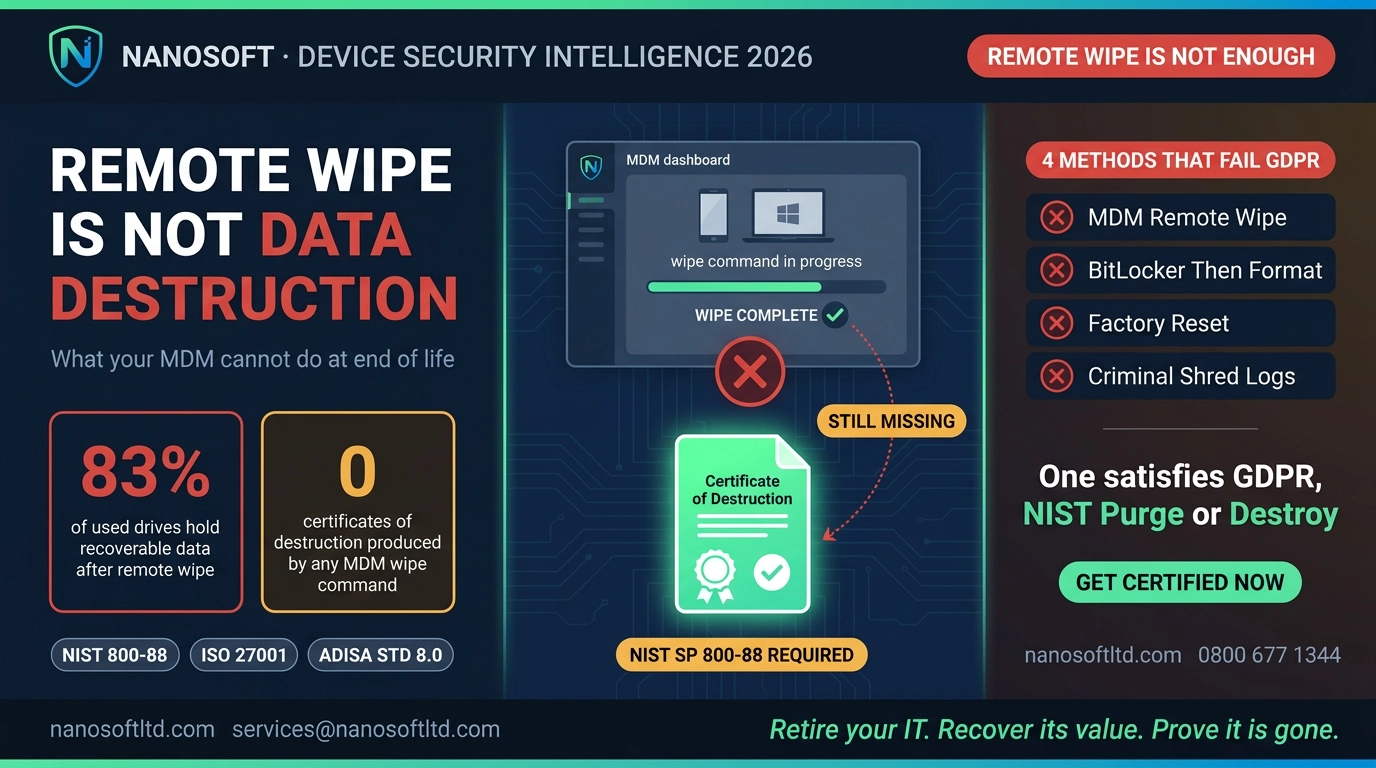
This is the technical reality behind the statistic that around 83% of used drives still hold recoverable data after basic deletion. The drives were not wiped. They were indexed, emptied and handed on, and the data remained exactly where it had always been.
The three levels of certified destruction and what they mean technically
NIST Special Publication 800-88 Revision 2, the international standard for media sanitisation, defines three levels of destruction, each addressing a different threat model.
Clear involves overwriting user-accessible storage areas with non-sensitive data. This defeats standard recovery tools that rely on file system access. It does not address data that may have migrated to over-provisioned areas or remapped sectors. It is appropriate for media that will be reused within the same organisation under the same security controls.
Purge applies techniques that address the full storage medium including areas inaccessible through normal read/write commands. For SSDs, this typically means ATA Secure Erase or cryptographic erase, both of which instruct the drive's own firmware to erase all cells including the over-provisioned reserve. For HDDs, it may involve degaussing (destroying the magnetic field across the entire platter) or multiple overwrite passes verified at the hardware level. Purge is the minimum standard for any media leaving an organisation's control.
Destroy is physical destruction: shredding, disintegrating, pulverising or incinerating the media so that no readable remnant exists. This is the appropriate level for media that has held classified or highly sensitive data, media that is physically damaged and cannot be reliably purged, or any situation where the highest possible assurance is required.
What this means in practice
The practical implication of all of this is straightforward. If your organisation retires devices without applying certified sanitisation, the data on those devices is accessible. Not theoretically accessible, not accessible only to sophisticated adversaries with specialist equipment. Accessible to anyone with a free download and twenty minutes.
The Certificate of Data Destruction that a certified ITAD partner provides is not a piece of paper for a compliance file. It is the documented evidence that the correct technical process was applied to every individual drive at the appropriate NIST level, verified and logged by serial number. It is the proof that the library not only removed the catalogue entries but shredded the books.
Retire your IT. Recover its value. Prove it is gone.
Nanosoft applies NIST SP 800-88 Rev. 2 certified data destruction to every job, with ATA Secure Erase or cryptographic erase for SSDs, verified overwrite for HDDs, and physical destruction where required. Every device is certified by serial number. Every certificate names the method and standard applied. The data is gone. We can prove it.
Contact Nanosoft: services@nanosoftltd.com | 0800 677 1344 | Unit 8 & 9 Maldon Trade Park, Heybridge, Maldon CM9 4LJ, UK
Nanosoft Team
Writer at Nanosoft - covering ITAD, data security, and sustainable technology lifecycle management.
Found this useful? Share it.